What the product does, what it costs, and what happens to anything you upload.
What does this give me that a job board does not?
Six things, in short:
One place, and it is the widest one. Around 600 employers read at source: banks,
hedge funds, prop shops, asset managers and the specialist headhunters. You stop checking twenty
careers pages and hoping you did not miss one.
A search that is a real query language. AND, OR, NOT, brackets, exact phrases and
word stems. You describe the job you actually want instead of guessing keywords and wading through
the rest.
Your CV, put to work on a specific opening. The AI reads a posting against your CV:
what genuinely fits, what the advert asks for that you have not evidenced, and how to reword your CV
for that role.
Ranking instead of reading. Every opening scored against you, so you start from the
best fits rather than the most recent.
Intelligence on the firm, not just its adverts. Recruiting Trends reads a firm's own
hiring over time and tells you whether it is expanding or quietly shrinking, which desks are growing,
what it actually pays from the bands it published itself, and which roles it keeps reposting because it
cannot fill them. On demand, an AI read on where the firm appears to be heading. This is what you want
before you apply, and certainly before you interview.
Nobody gets your CV. It is never sent to employers, recruiters or headhunters.
Uploading here does not put you into anyone's funnel, and nobody will call you about a role you did not
choose. If you are employed and looking quietly, that is the point.
Worth knowing too:
The detail boards throw away: application deadlines, when a role first appeared, and
whether it is still live. It tells you what to apply for today rather than next week.
Who you already know at each firm, from your own LinkedIn contacts, so you can find
the warm introduction before sending a cold application.
Where do the job offers come from?
From the firms themselves. We read the careers systems of around 600 banks, hedge funds, prop shops,
asset managers and specialist headhunters directly, once a day. There is no job board in the middle.
That has real consequences:
You see roles when they are posted, not after an aggregator gets round to copying
them.
You get the detail boards throw away: when a role first appeared, when applications
close, whether it is still live, and whether the firm has posted it before.
A repost is a signal. The same title going up again means the firm could not fill it,
which is either leverage for you or a warning about the desk.
The description is the firm's own, not a rewritten summary.
How do I search? (the filter is more powerful than it looks)
The filter box is not a keyword box. It is a proper query language: AND, OR,
NOT, brackets nested as deep as you like, quoted phrases and * endings. One
well-built query replaces a dozen searches, and it runs across the title, the location and the full text
of the advert.
Three worked examples.
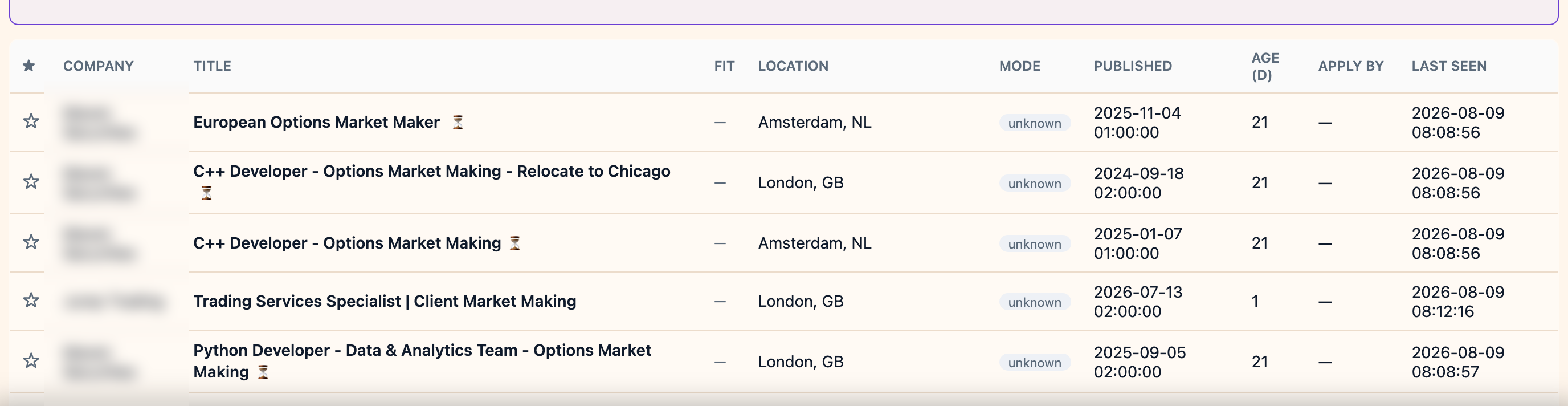
1. A specific desk, in specific cities, without the junior noise
("market making" OR "market maker") AND (london OR amsterdam) NOT (intern* OR graduate)
Quotes hold each phrase together, the brackets keep the two cities as one condition, and
NOT strips internships and graduate schemes in one move.
Employer names blurred. Everything else is a real result.
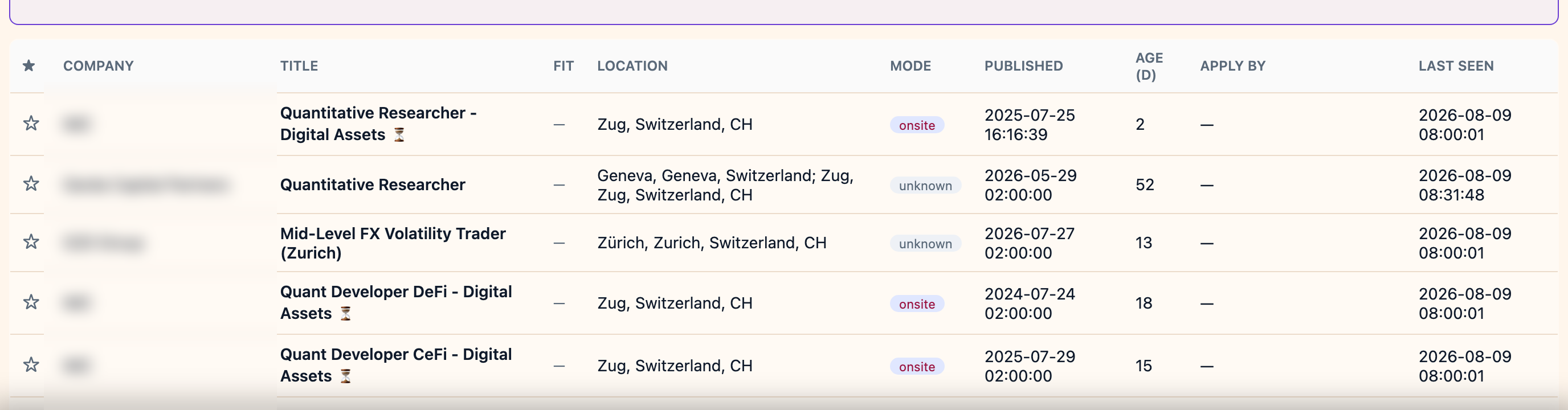
2. Two role families at once, in one country
(quant* AND (research* OR trader)) AND switzerland NOT (intern* OR graduate)
quant* catches quant, quants and quantitative. The inner bracket says researcher or
trader, and the outer one requires both that and quant*. A country name filters on where
the role is actually based, so Zug, Geneva and Zürich all qualify.
Employer names blurred. Everything else is a real result.
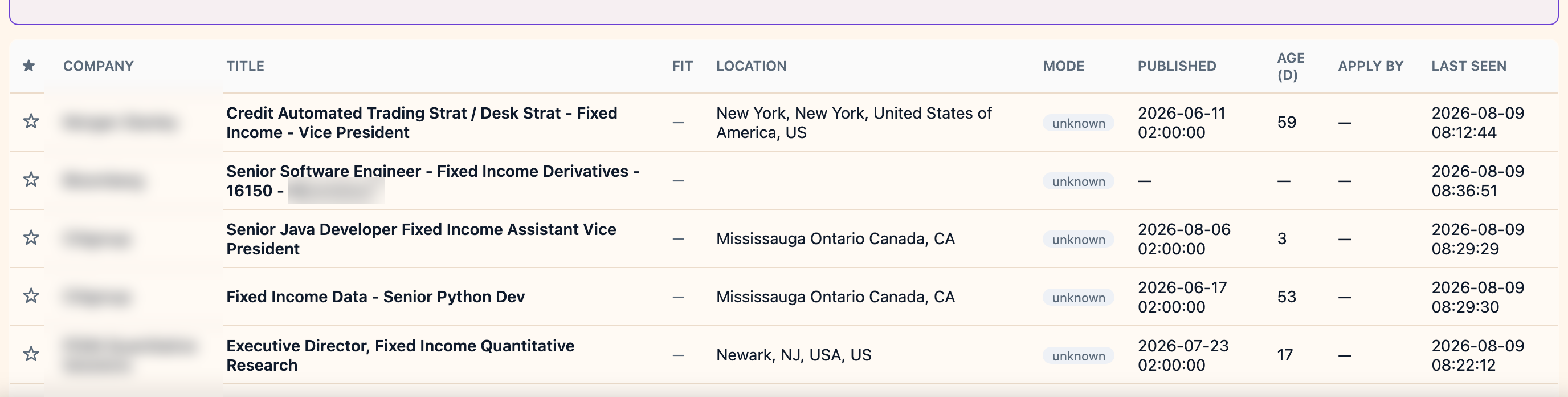
3. A skill set across several desks, minus the sales roles
("fixed income" OR rates OR credit) AND (structur* OR deriv*) NOT (sales OR intern*)
Three product areas in the first bracket, two skill stems in the second, and NOT sales
removes the client-facing roles that always crowd these terms.
Employer names blurred. Everything else is a real result.
Everything else on the row stays available alongside the query: country, advert age,
remote/hybrid/onsite, firm, and whether the role is still live.
Why should I upload my CV, and where do I do it?
Go to Profile → My CV → Upload. A PDF or Word file is fine.
Without a CV you can still search and filter every offer. With one, the app can rank openings by how
well they actually fit you, show you what a posting asks for that your CV does not yet evidence, and
suggest how to reword it for a role you want. You can upload several versions and switch between them;
the one being scored is chosen from the CV dropdown in AI Insights → CV Analysis and is
badged scoring.
What happens to my CV? Who gets to see it?
Before it reaches the AI, we strip the contact details out of it: email addresses, phone numbers,
LinkedIn and GitHub links, postal address, date of birth, and the name line at the top. The AI sees your
experience, not your identity.
What never happens:
It is never sent to employers, recruiters or headhunters. You apply yourself,
directly, on the employer's own site. Nobody contacts you about roles.
It is never used to train any AI model, by us or by our providers.
It is never sold or rented, and never used for advertising.
Our AI providers are named in the Privacy Policy and are in the United
States; you consent to that transfer explicitly when you upload. Delete the CV at any time from your
profile: that erases the file, the extracted profile and every analysis built from it.
Please strip out anything we do not need before uploading: photograph, date of birth, civil status,
nationality, and anything about health, religion or union membership.
Why import my LinkedIn connections, and how?
Export Connections.csv from LinkedIn (Settings → Data privacy → Get a copy of your
data), then load it in Profile → Import LinkedIn connections.
It powers one thing: showing you which of your own contacts already work at firms that are hiring for
roles matching you. A warm introduction beats a cold application, and this tells you where you have
one.
What happens to my connections?
They stay here. Your connections are never sent to any AI provider, never shown to
another user, never shared with employers or recruiters, never sold, and never used to contact anyone.
They never leave the platform.
They are stored encrypted under a key tied to your account. We deliberately do not keep their
email addresses at all. Delete them at any time; that removes every imported connection and the
matches drawn from them.
What can the AI do in the CV Analysis tab?
Two things run from the CV Analysis panel itself:
Score my matches ranks the open offers against your selected CV in one pass, so you
start from the best fits instead of reading everything.
Gap synthesis gives a recruiter's read across a whole pool at once, split into
strong matches and near misses, so you see what keeps coming up rather than one opinion.
Three more run on a single offer, from the panel that opens when you click a role in the Jobs list:
Score match (AI) scores just that role against your CV.
Strengths / Weaknesses (AI) gives an honest read on you for it.
Tailor my application (AI) suggests how to reword your CV for that posting;
re-score afterwards to see whether it moved.
Results are stored per CV version, so reopening an offer replays the previous analysis without spending
credits again. Closing soon is not AI: it lists matched roles whose deadline is near.
What is Recruiting Trends?
A read on one firm, built from its own postings over time rather than from anything it says about
itself. For a firm you pick, it shows:
Hiring momentum: whether it is opening more or fewer roles than before.
Who they're hiring: which desks are growing, and how that has shifted against six
months ago.
Compensation: the salary bands the firm has actually disclosed, against the wider
market.
Your fit and your network strengths: how you score there, and which
of your contacts are already inside.
Repost signals: the roles it keeps failing to fill.
Strategic analysis (AI), on demand, which reads the pattern and tells you where the
firm appears to be heading.
It is most useful before you apply or interview: it tells you how a desk is evolving.
What does the monthly membership include?
The membership is everything that does not need an AI to think about it, and it is not metered. The
current price and trial length are on the pricing section of the home page.
In particular:
The filter search, without limits. Every query in the section above is included,
however many you run. There is no per-search charge and no daily cap, so you can keep refining a query
until it is exactly right.
The whole corpus at source, around 600 banks, hedge funds, prop shops, asset
managers and specialist headhunters, re-read once a day.
The detail job boards discard: salary bands the firms themselves published,
application deadlines, when a role first appeared, whether it is still live, and whether it has been
posted before.
The firm pages and Recruiting Trends: hiring momentum, which desks are growing,
disclosed compensation, repost signals.
Your LinkedIn network matched per firm, so you can see where you already have a warm
introduction.
CV upload and storage, including several versions to switch between.
You could use the product for a long time on the membership alone and never spend a credit.
What are AI credits for, and how far do they go?
Credits pay for the things where a model actually reads something on your behalf: scoring your CV
against openings, the strengths and weaknesses read, gap synthesis, tailoring your CV to a posting,
and a firm's strategic analysis. Everything else is in the membership.
They are billed on what you actually use, not per click, so a small action costs a small amount. There
is no subscription to them and nothing expires on a timer: you top up when you run low, and only
then.
Each action costs cents, not euros. Your trial starts with enough credit to try every AI feature, and
for normal use a top-up lasts a long time. Your balance and history are always visible in the app.